Built for the deposition room and the courtroom

Everyone on the same page. Literally.

HandOut is attorney-first exhibit sharing. Mark stickers, share the page, pause when you need a private look, and keep the room — counsel, witness, and court reporter — locked to what you are showing.

  • Join by QR, link, or code — no account, no install
  • You control the page. Sync All if anyone drifts
  • Private prep never leaks until you resume
  • Electronic signatures and private file requests — in the session, on your terms
  • Keep Zoom or Webex open — HandOut sits beside the video, not on top of it
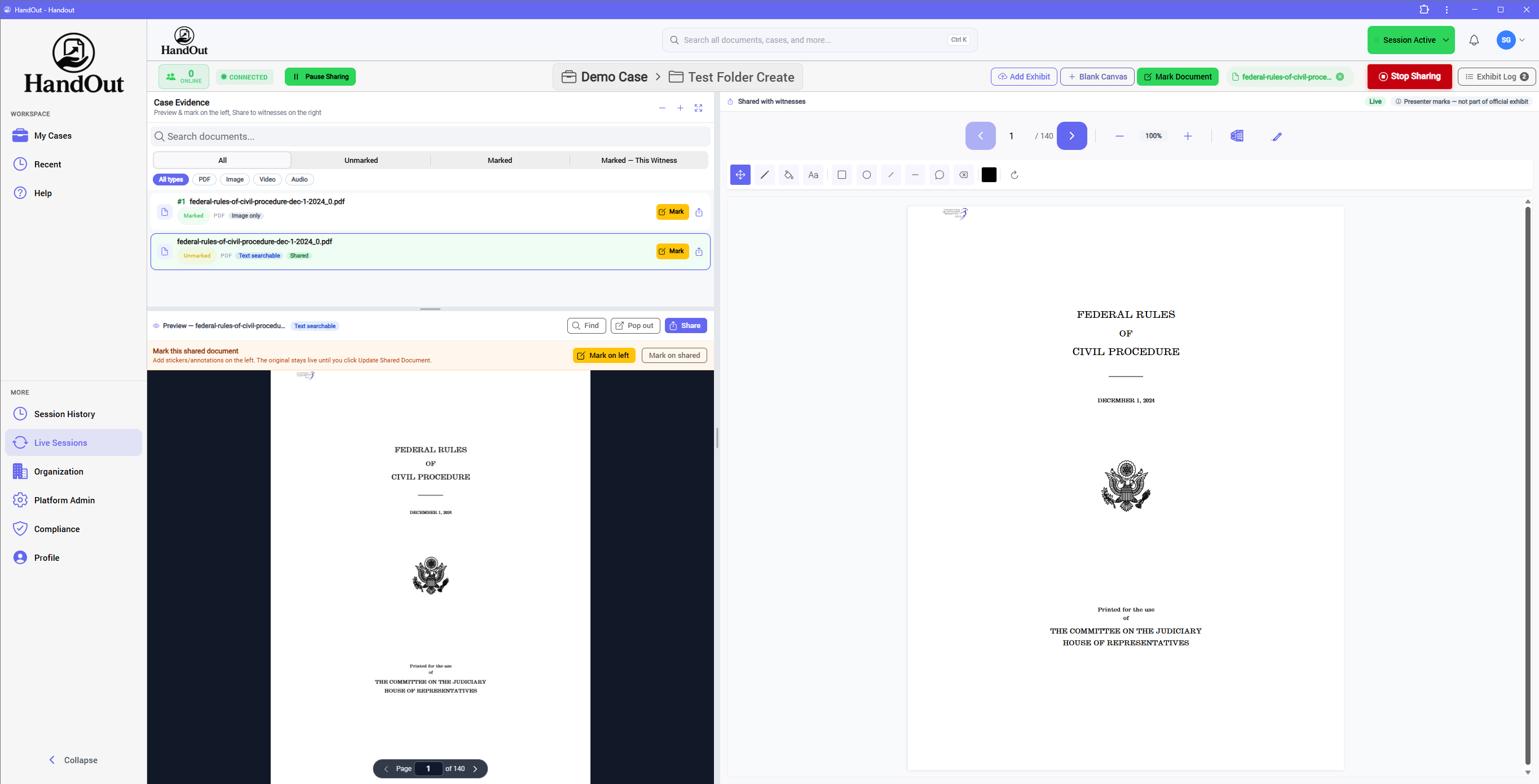
HandOut live session with a projected callout on the shared exhibit for the witness

Designed the way the room already works — binders, stickers, and a host in control.

Attorneys Paralegals Court reporters Witnesses

The interruption

Paper does not fail because it is old. It fails because it stalls the exam.

Physical exhibits create unnecessary friction in depositions. Attorneys have to print, organize, transport, distribute, and manage documents before they can even ask a question. In remote depositions, that problem gets worse — exhibits may need to be shipped in advance, creating logistical headaches and potentially exposing documents before they are introduced. And when an attorney needs an unexpected document, photo, or video, the traditional exhibit process can bring the deposition to a halt.

Introduce the exhibit when the testimony calls for it — not when the logistics allow it.

Paper HandOut
Prep. Print, sort, label, copy, binder, ship. Upload once. The folder is the binder.
Remote. Overnight the set. Hope they do not peek. Join by code. They see nothing until you share.
Screen-share. The exhibit eats the video. Faces disappear. Beside the call. Zoom or Webex stays open. HandOut is the viewer.
Lost time. Hunt the binder. Pass copies. Wait for the page. Same page. The room follows you. Sync All if anyone drifts.
Surprise doc. The exam stops. Or you skip the question. Pull and share. If it is in the case, it can be in front of the witness.
Non-paper. Video, audio, 400-page PDFs, hi-res photos. Same dock. PDF, image, video, and audio — same share.
Cost. Printers, tabs, couriers, staff time, travel. A seat. No overnight. No copy set. No courier.
Control. The binder is already in their lap. Pause sharing. Private prep. Resume when you are ready.
The record. Reconstruct what was marked after the fact. The package. Access code, expiring link, Certified Exhibit Log.

The product

From case folder to “let the record reflect Exhibit 2.”

These are real HandOut screens — prepare the matter, open a live session, mark the sticker, take a signature, request a file, and send the marked set when the proceeding wraps.

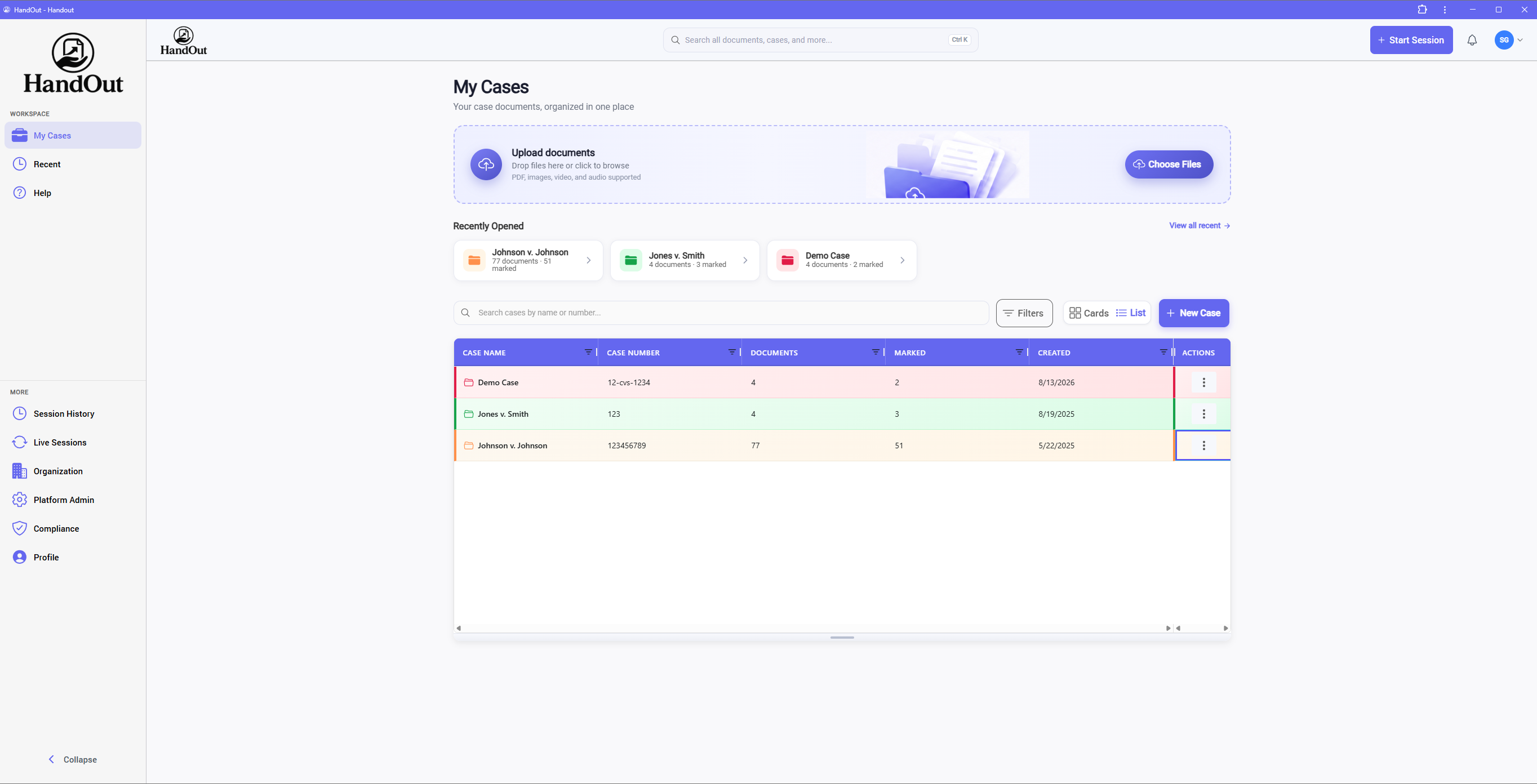
HandOut My Cases dashboard with search, Start Session, and a list of cases

Paper: print, tab, binder, ship — before a single question.

Build the binder before the room sits down

Create the matter — case type, number, client, opposing counsel. Upload PDFs, images, video, and audio into folders (witness, topic, discovery set) or All Documents. Dedicated viewers for each file type. When deposition day comes, the files are already here.

  • Color-coded cards or table view; search, filter, recent cases
  • Bulk upload and case-wide document search and sort
  • Multi-select to move, number, or delete
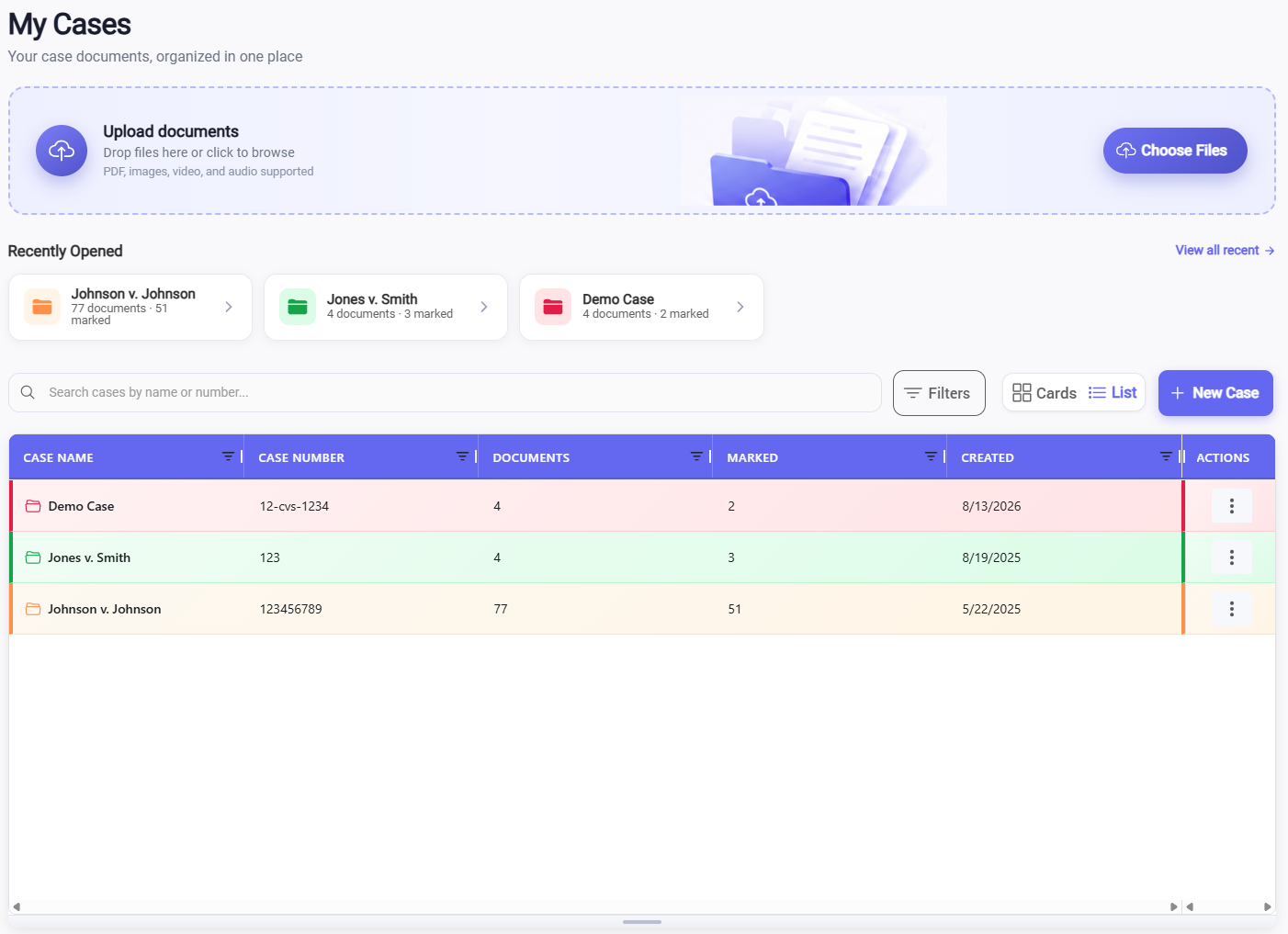
HandOut case list with recently opened folders and marked document counts

Paper: minutes lost hunting tabs while the clock runs.

Find it without flipping the binder

Search by name or number. Search inside PDFs too — the text is searchable, so you can find the clause without flipping pages. Color-coded cases keep the matter in front of you so counsel is not paging through tabs while the witness waits.

  • Folders by witness, topic, or discovery set — plus All Documents
  • Filters, search, and text-searchable PDFs
  • Multi-select: move, number, or delete
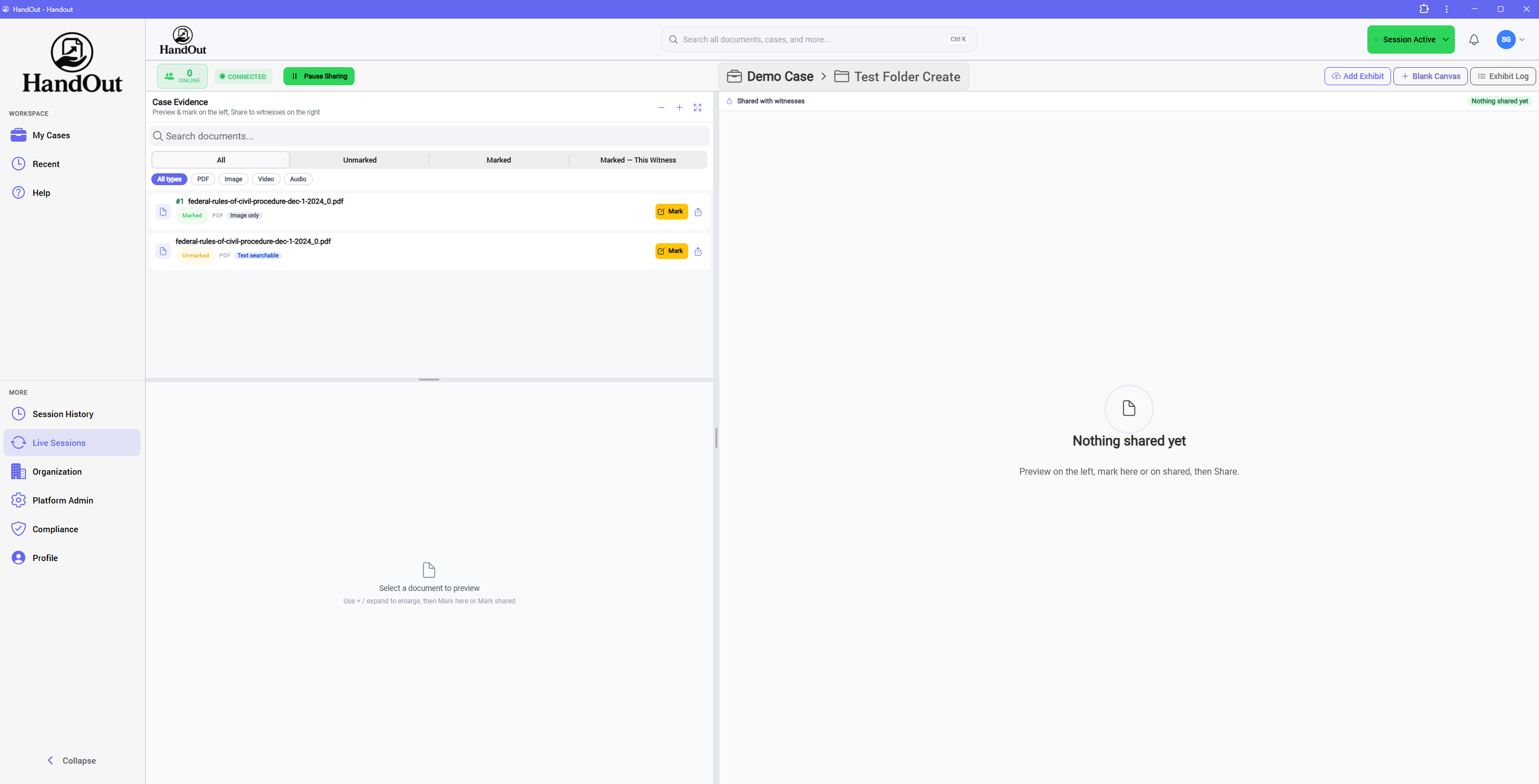
HandOut live session with Case Evidence on the left and nothing shared with witnesses yet

Paper: once the binder is in their lap, you already shared tomorrow’s exhibit.

Open the room. Share nothing until you are ready.

Start a timed session (1–24 hours) tied to a case and folder. Case Evidence stays on the left. Shared with witnesses stays blank until you hit Share. Guests wait until you Accept or Decline.

  • Pause Sharing so you can prep without leaking
  • Dual pane: prep left, share right
  • Add Exhibit, Blank Canvas, and Certified Exhibit Log
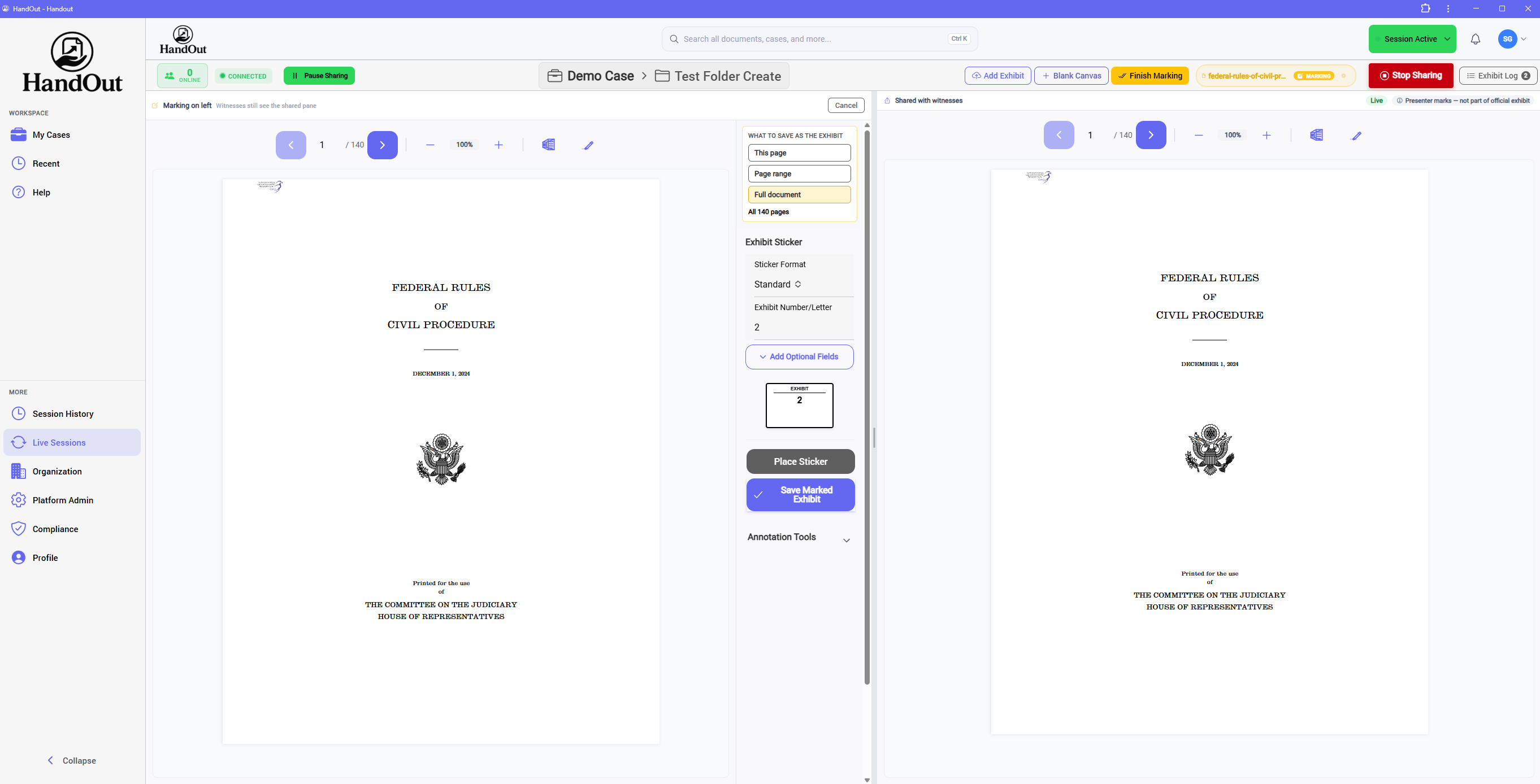
HandOut marking mode with Exhibit 2 sticker while witnesses still see the shared pane

Paper: a roll of labels, a stamp, and a copy that may not match the record.

Stickers in the app — not in your bag

Mark on the left while witnesses still see the shared pane. Place Standard, Deposition, Trial, or Custom stickers. Save a new marked copy — the original file is not overwritten. You don’t keep up with the next number — HandOut advances it for that witness.

  • This page, a range, or the full PDF — optional sticker fields for case number, date, witness, color
  • Pen, highlighter, text, shapes, line, underline, callout
  • Host-only private notes in the gutter — viewers never see them
HandOut host sharing a PDF with witnesses, with Case Evidence and annotation tools

Paper: pass copies around the table — or stop the exam for a surprise document.

You run the room. The exhibit does not wander.

Share from the dock the moment you need it — including a document you did not plan to use. Add Exhibit mid-session without renumbering what is already marked. Video, audio, photos, and PDFs live in the same place. Host controls play, pause, and seek — for the room, or host-only.

  • Pause / resume so private prep stays private
  • Sync All to Current Page if anyone drifts
  • Independent page scrolling only if you turn it on
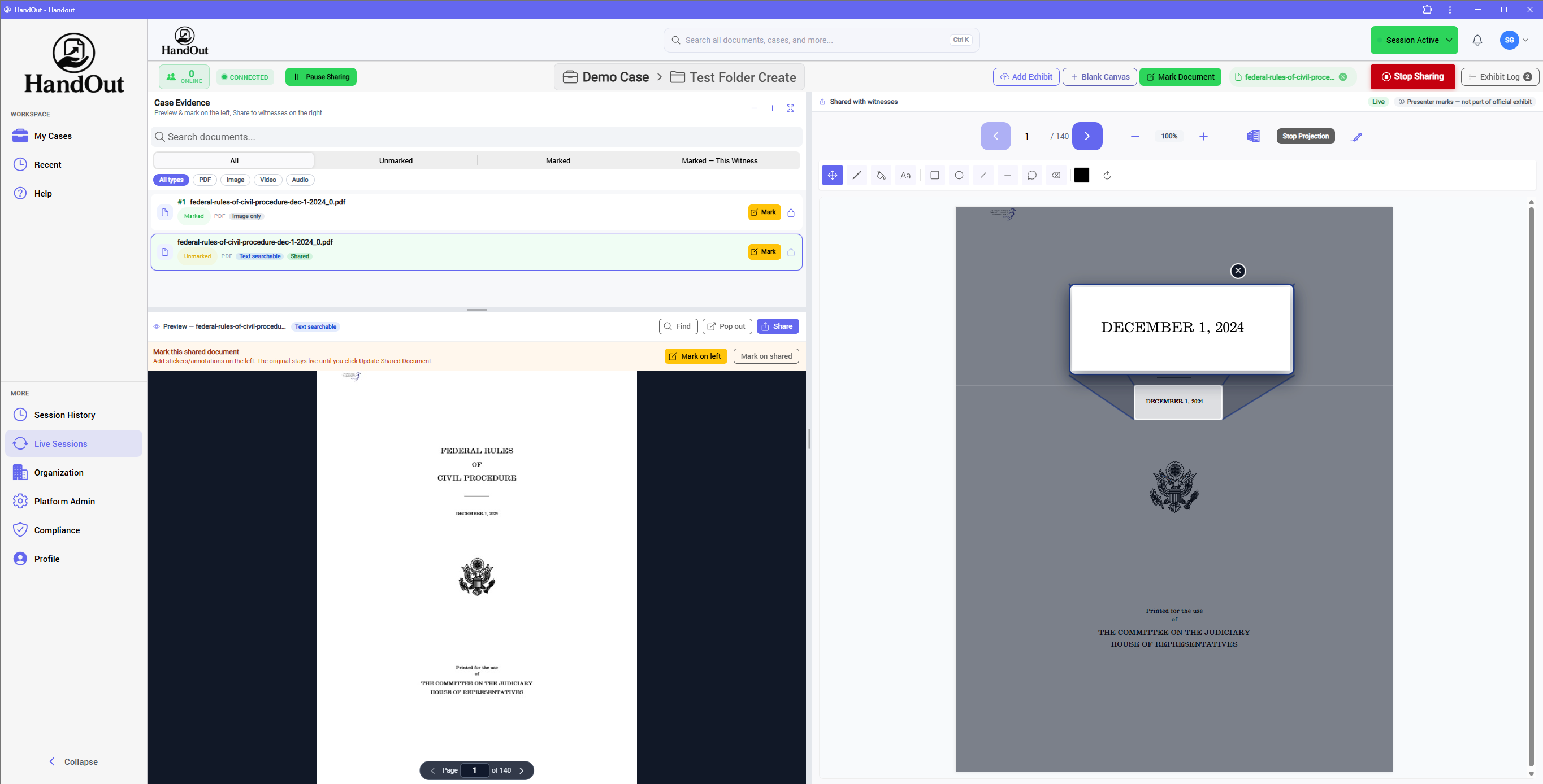
HandOut projection callout enlarging a line of text on the shared exhibit

Paper: “Look at the second paragraph on page 14 — no, the left column, about halfway down.”

Put the witness on the exact spot — instantly

Stop talking them onto the page. Highlight the line or project it, and they are looking at that clause, date, or sentence in a second — not hunting while the clock runs. Counsel, the witness, and the reporter see the same spot. Stop projection when you are done.

  • Live highlight — a temporary region, not saved as an annotation
  • Projection zoom — magnify a region for the room
  • Stop Projection without leaving the shared document

In the live session

Electronic signatures

Place the fields. Request Completion. The witness types their full legal name, consents, signs, and you keep an audit record — without flashing the signature to the whole room.

  • Add Signing Fields
  • To Be Signed
  • Request Completion
  • Audit record

Paper: pass the pen, wait, hope the sticker doesn’t cover the line they just signed.

Get the signature without stopping the exam

Drop signature, date, name, and text fields on a PDF before or during the session. When you are ready, Request Completion from that viewer. They type their full legal name, consent, and sign. HandOut saves a signed copy with an electronic signature certificate — who signed, when, from what device. The signed file stays off the shared screen until you introduce it.

  • Fields: signature, date, name, and text
  • Witness types their full legal name, then signs
  • Signed copy + audit record in All Documents — not live until you share

In the live session

File requests

Ask a participant for a PDF or photo. It lands in a private host inbox. You preview it — then accept it into the case, or reject it.

  • Request file
  • Private inbox
  • Preview
  • Accept into case

Paper: “Can you email that to us?” — then the exam waits on an attachment that everyone sees too soon.

Pull a file from the witness without putting it on the screen

Request a file from a participant during the session. They upload from their laptop or tablet. You review it privately, then Accept into case — into All Documents or a folder — or Reject. Nothing is shared with the room until you share it.

  • Host requests; the viewer uploads or declines
  • Private review — not on the shared exhibit
  • Accept into the case when you are ready to use it
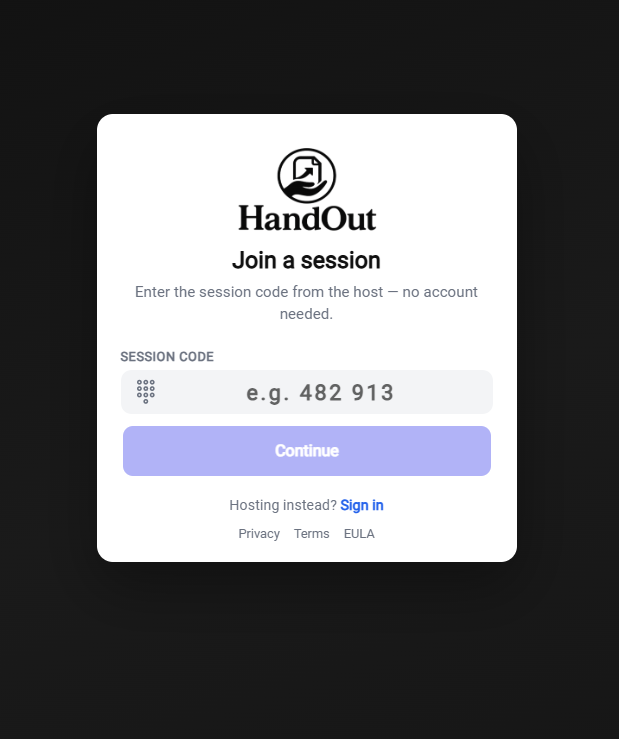
Join a HandOut session with a code, no account required

Paper: a box of exhibits waiting at the hotel — or nothing if the courier is late.

Counsel hosts. The witness just joins.

Guests join by QR, link, code, or email — no account, no install. They wait in a waiting room until you Accept or Decline. Nothing on their screen until you introduce it.

  • Host admits each guest
  • No HandOut account required to join
  • Try the join screen — no login required to look
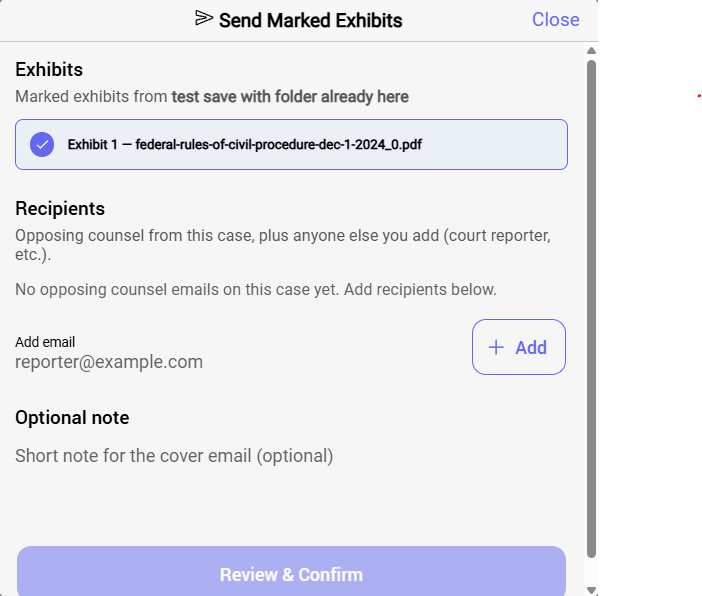
HandOut Send Marked Exhibits: select exhibits, add recipient emails, optional note, and Review & Confirm

Paper: reconstruct an email chain of PDFs — or wait on the copy set.

Send the marked exhibits when it wraps

Send a package of marked exhibits to counsel or the court reporter. Recipients verify with email and an access code. Links expire and can be revoked. Track opened vs downloaded. After the session, download an Exhibit Binder (ZIP + index) from session history.

  • Marked exhibits only — not the whole binder
  • Time-limited link, access code, revocable
  • See opened vs downloaded, and by whom

Who it is for

Every person in the room gets a cleaner hour.

Last-minute exhibits used to halt the room

Searching binders, handing copies, waiting for the page — that is time off the record you do not get back. You decide what is shown, when sharing pauses, and who may annotate. If the document is in the case, you can put it in front of the witness when the question needs it.

  • You stay the host. Viewers follow your page — they do not wander the binder
  • Host-only private notes — viewers never see them
  • Certified Exhibit Log of what was shown, and when
  • Marked copies are new files; the original PDF is not overwritten

Days of copy sets for a proceeding that still goes off-script

Printing, tabs, couriers, and staff time add cost without adding a better question. Upload once, folder by witness, pre-mark, and send the package when it wraps. If counsel reaches for something unplanned, it is already in the matter — not at the printer.

  • Drag-and-drop PDFs, images, video, and audio
  • Text-searchable PDFs so counsel can find the line in seconds
  • Pre-mark if you want — or let HandOut number as you go for that witness
  • Folders by witness, topic, or discovery set
  • Place signing fields; save into To Be Signed
  • Send a secure package when the proceeding wraps

Stop reconstructing “the document the witness is looking at”

Paper and Zoom shares leave parentheticals that nobody can later match to a Bates number. Join with a code. Follow the host’s page. Receive the marked set with the numbers that were actually used.

  • Live follow without installing software
  • Certified Exhibit Log of what was shown, and when
  • Secure package: access code, expiring link, opened vs downloaded

A binder they can flip through before the question

Once paper is in their hands, counsel has less control over what they see next. Join on a tablet or laptop. See only what the host shares. Annotate with a finger only if counsel allows it.

  • No HandOut account required to join
  • Waiting room until the host admits you
  • Never see the host’s private notes
  • Sign or send a file only when counsel asks — not on the shared screen until they share

How it works

From upload to “everyone sees it” in seconds not minutes!

Designed so counsel or a paralegal can run the room without a training seminar.

  1. Prepare Upload into the matter. Folders by witness or topic. Pre-mark if you want — originals stay original.
  2. Invite QR, link, code, or email. Guests wait until you Accept or Decline. Laptop or tablet, no account.
  3. Present You control the page. Pause anytime. Certified Exhibit Log records what was shown, and when. Keep Zoom or Webex open — HandOut does not take over the video.
  4. Capture Mark exhibits — HandOut numbers the next one for that witness. Request a signature or a file from the witness when testimony calls for it.
  5. Send When it wraps, send a secure package — email + access code, expiring link, revocable. Or download the Exhibit Binder from session history.
  6. Track See opened vs downloaded, and by whom.

Prefer to watch it? Watch tutorials on YouTube

Beside the video — not instead of it

Works with all Videoconference platforms. Faces stay on screen.

HandOut does not replace the videoconference and it does not share your desktop over the people in the room. Counsel, the witness, and the reporter keep Webex or Zoom open for faces and the record. They open the HandOut viewer next to it for the exhibit. No fighting windows. No hiding tiles. The video stays the video. The exhibit stays the exhibit.

Presenter control

You decide what the room sees

Once a paper binder is in the witness’s lap, you have already shared tomorrow’s exhibit. In HandOut, the host stays in charge. Viewers never wander ahead. Annotations are permissioned. Private prep never leaks until you share.

  • Private notes on the page — host only; viewers never see them
  • Per-person: annotation and independent scrolling, off by default
  • Request Completion for signatures; request a file and preview before it enters the case
  • Certified Exhibit Log of what was shown, and when

Capabilities

What HandOut is built to do in the room

Easy session access

Invite by QR, session code, join link, or email. Guests need no account. They wait until you Accept or Decline.

Mark exhibits instantly

Standard, Deposition, Trial, or Custom stickers. Save a new marked copy — the original is not overwritten. HandOut advances the next number for that witness.

Sync everyone to your view

Live page follow while you present — plus one-click “Sync All to Current Page.” Independent scrolling stays off unless you allow it.

Put them on the exact spot

Live highlight or projection zoom. Skip talking the witness onto the page — they are looking at that sentence almost instantly.

Text-searchable PDFs

Find a word, date, or clause inside the exhibit — not just the file name. Search in the case folder or in the live session.

Private prep

Pause Sharing while you jump pages or place stickers. Dual pane: prep on the left, share on the right. Nothing leaks until you resume.

Private notes

Host-only stickies on the page — fonts and pad colors, hide or show. Viewers never see them, in prep or live.

Electronic signatures

Lay out signature, date, name, and text fields. Request Completion. The witness types their full legal name, consents, and signs. Signed copy stays off the shared screen until you introduce it.

Request a file

Need something the witness has on their device? Request it in the session. Preview, then accept into the case — or reject. Never auto-shared.

Certified exhibit log

A running record of what was shown to witnesses, and when. It follows the session into history.

Blank canvas

Draw together live, then save and sticker it as an image exhibit.

Video & audio in sync

Host controls play, pause, and seek. Play for the room, or keep playback host-only while witnesses see a placeholder.

Permissioned markup

Per person: allow annotation and/or independent page scrolling. Both off by default. Save witness annotations into a new exhibit — original unchanged.

Beside Zoom and Webex

Keep the videoconference open. Open HandOut next to it. Exhibits never cover faces or eat the video.

Secure packages

Send marked exhibits only. Recipients verify with email and an access code. Links expire and can be revoked. Track opened vs downloaded.

Originals stay original

Marked copies are new files. The source PDF is not overwritten. Add Exhibit mid-session without renumbering what is already marked.

Your cases are yours

We cannot see your documents or files — even if we wanted to. Client privacy and security are a top priority.

Pricing

Seamless exhibit sharing for legal teams

Solo, Team, and Firm include the same HandOut feature set. Upgrade for more users, more storage, and administration — not a stripped-down product. No overnight binders. No copy sets.

Storage is included on every subscription: Solo 25 GB · Team 75 GB · Firm 150 GB. Enterprise includes volume storage. Need more? Add 50 GB for $10/month.

Solo

$129 / month

One user. Full HandOut. 25 GB included.

  • 1 user
  • Unlimited proceedings
  • Full HandOut feature set
  • 25 GB storage
Sign up now

Firm

$599 / month

Up to 10 users — same product at firm scale. 150 GB included.

  • Up to 10 users
  • Unlimited proceedings
  • Full HandOut feature set
  • Firm administration
  • 150 GB storage
Sign up now

Occasional

$149 / proceeding

No subscription. 24 hours of use — enough time to load documents before the deposition.

  • $149 per proceeding
  • 24-hour window to set up and take the exam
  • Full HandOut feature set
Sign up now

Enterprise

Let’s talk

11+ users, volume storage, onboarding, and priority support.

  • 11+ users
  • Volume storage
  • Onboarding
  • Priority support
Contact us

Court reporting partner

Custom

Partner with us to offer HandOut to your clients!

  • We want to help you succeed!
  • Usage-based options
  • Built for reporting firms
Let’s talk

Solo, Team, and Firm are the same product. You add seats, storage, and administration — not missing features. Need more room? Extra storage is 50 GB for $10/month. Your cases are yours: we cannot see your files, even if we wanted to. Compare plans in detail

Ready when the room is ready

Join HandOut and introduce the exhibit when you need it — not when the courier arrives.